

on-imac

Generate AWS, Azure, GCP, K8s, Security Diagrams Automatically

Network, Topology, Security and Container Diagrams + Monitoring Alerts - Hands Free

Do you have up to date cloud environment diagrams on hand when you need them?
Hava generates and updates your cloud documentation so you don't have to.

Find OUT More

Work with us 

Leverage Hava to deliver services and results for your managed services client base.

Explore, document and monitor cloud environments like never before.


Work with us.

Introducing Hava to your client base and tech stack is a win-win for everyone involved.

Recurring revenue for your business, additional service revenue opportunities and creating a more transparent and efficient relationship with your clients means they value your service more and stick around longer.

Fill in your details below and we'll hook you up with access and discuss the opportunity from there.


Get Started

What is Hava?


Connect AWS, Azure, GCP to Hava (Online or Self-Hosted)

From a central point you can monitor all the cloud account environments you connect. Hava automatically generates resource, network, container and security diagrams and keeps them up to date without manual intervention. You can set alerts so you and your security team are fully aware of newly deployed resources, whether it's your team or a client making the changes.
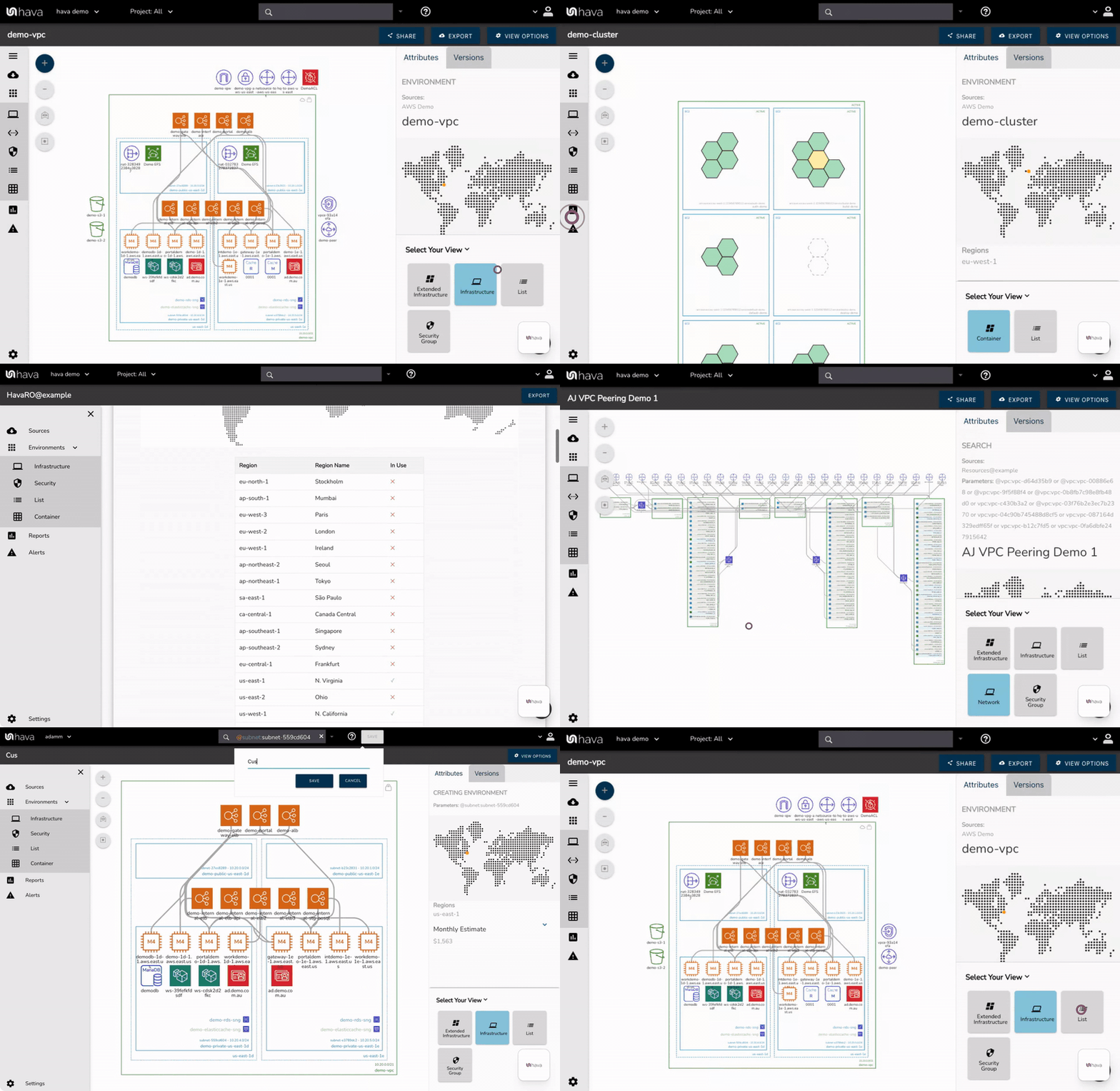
aws diagram overview gif


Auto Generate and Auto Update

When you auto generate diagrams that automatically keep themselves up to date, you free up your time, your architects and engineers time and still have accurate diagrams on hand to help diagnose problems when they occur.

Visualised network topology surfaces anomalies that can be difficult to spot in cloud console settings, you get to see what is running and where it's running across all your connected cloud accounts including multi vendor hybrid cloud deployments.

Hava keeps all your diagrams up to date on auto pilot. As changes are detected, new diagrams are produced and superseded diagrams moved to version history, even if you haven't logged into Hava. There is no need to manually trigger updates, it's done for you. However if you need to diagram changes immediately you can sync whenever you like, either via the Hava app, using pipeline integrations or via API.


Architectural Monitoring Alerts

When changes are detected in the configuration of the cloud accounts you are managing, Hava can trigger an alert that lets your know when that change is detected. This means you always know what is happening in your cloud accounts and for MSPs it means you can let clients loose on their own infrastructure and resources but you can keep an eye on the changes and can warn them of any security or cost implications of the deployed changes - no more bill shock! 


Find Cloud Resources Fast

The query tool built into Hava is a powerful search function that can interrogate hundreds of cloud accounts across multiple vendors simultaneously from a single point, with a single command.
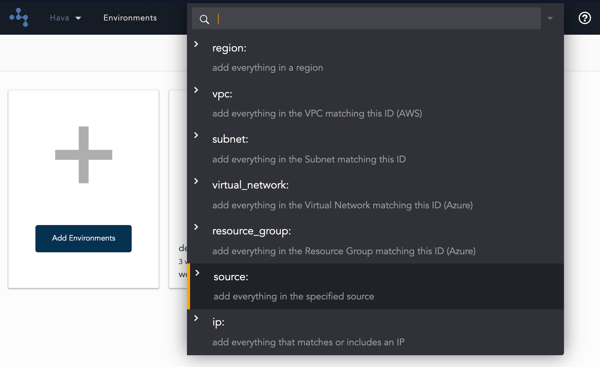
 

search


You can search for tags, resources, IP addresses, resource types, names and a whole host of other search parameters and combinations to locate matching cloud resources, no matter what vendor or cloud account they are located in.

Now there is no need to log into hundreds of consoles to locate the asset you are looking for.

Why Hava?

Speed up On-boarding - When you take on new engineers or engage cloud consultants, having accurate up to date diagrams means you can show them exactly what you have deployed in a format that is easy to comprehend.

See What's Running Where - When you inherit environments the first question you ask is what is running where. Connect to Hava and you have the answer. The same is true if you are managing lots of accounts. The first step is to see what is running where before you start troubleshooting.

Never Start From Scratch - Before starting a network redesign or performance improvement proposal, you can turn to Hava for a picture of what is running now. You can then document your proposed changes without having to draw complex networks from scratch.

Track Changes - When changes are detected in your cloud config, Hava saves the previous diagrams to version history. So when you want to identify resource changes in the middle of an outage, or compare cost changes, you can. This is especially useful during ISO/PCI/SOC audits when you need to identify changes since the last audit.

Embed Diagrams Anywhere - You can embed fully interactive Hava diagrams outside of the application, like in say a Wiki, in Github or any web property. Diagram endpoints can be placed once, and as your diagrams update, the embedded diagram automatically updates. This means your Confluence page, GitHub doco or intranet stays up to date automatically.

CMDB Validation - When you are maintaining a cmdb, you can drop in a diagram link so you can view the cloud asset in context

Validate your AWS Compliance - Using the built in AWS compliance report, you can see how well your AWS configuration complies to best practice and well architected standards. The report will highlight potential problems and suggest solutions.

Monitor Container Task Health- Hava's container view visualises the run status of your cluster tasks or pods. You can see at a glance the health and status of your cluster and any pods or tasks that are in a sub optimal state.

JUST AFTER MIDNIGHT

FEATURED CUSTOMER

"Hava has grown into a comprehensive tool for mapping out entire network topologies, in minutes. Rather than spending hours trawling through cloud consoles, firing up needless drawing tools or having new customers dig through historical data, Hava automatically generates a full layout of the new cloud environment."

Callum Davies - Managing Director, Asia

Testimonial_JAM247

Kinect Consulting

"Kinect Consulting are a team of Cloud Strategy specialists, we ran Hava during discovery for a large cloud client and 17 groups all found something they didn't know existed"

Aaron Moore, CTO Kinect Consulting

Kinect_Testimonial

Security

When you connect Azure and AWS to Hava, you will generate a security view that details all the configured security groups on your virtual networks.
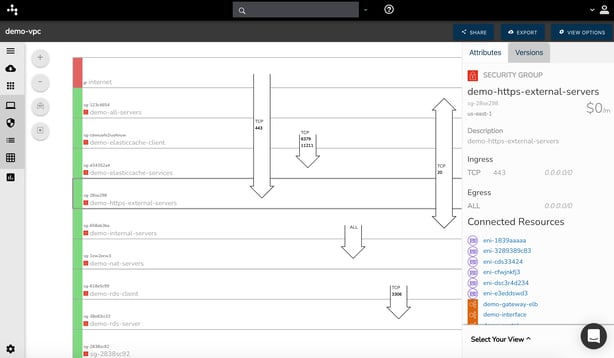
 

Hava_Security_View_2021


This interactive diagram shows all your security groups and when a SG is selected you can see all the connected resources, ingress and egress IP details and other relevant metadata. The overlaid arrows show you how traffic enters and exits your network with details on the ports and protocols in use.

This allows you to show your security team your cloud security posture and when used in conjunction with the infrastructure view diagram, they will better understand how your network hangs together. They will visually understand what is going on and where attention may be needed without spending days checking individual cloud resources in the console.

In terms of Hava security, the app connects via read only credentials and scans configuration settings only, no client data is read or stored. Data required to generate diagrams is encrypted in transit and at rest and the entire application can be self hosted on your own cloud infrastructure behind your own security.

Integrations


There are a number of ways to integrate diagrams and t rigger actions outside of the Hava application.

GitHub Integration - Available on the GitHub marketplace, the Hava sync action allows you to trigger diagram updates and optionally retrieve updated diagrams to your Github Docs repo from within your deployment workflow.

Confluence - The Hava diagram viewer is available on the Atlassian marketplace and allows you to easily insert interactive diagrams into Confluence.

Embeds - Have provides the ability to embed your diagrams via iFrame code snippets. This means you can embed interactive diagrams anywhere that supports iFrames, like Notion, other web apps, the list is endless. The embeds utilise a dynamic URL that hosts the latest diagram version, so you only ever have to embed once.

API - Hava has an API you can use to programatically perform the operations you can within the application UI. You can add and remove data sources, trigger diagram updates, retrieve diagrams using API calls. This means you can build diagramming into your CI/CD pipeline or perform bulk actions using code and not the Hava app.

Export - You can export diagrams for analysis, archiving, use in proposals or management reports or for editing. The PDF and PNG file formats provide formatted diagrams, the VSDX export allows you to edit the diagrams using Visio, draw.io or other compatible editors, whereas the CSV and JSON exports provide the raw data you can use to diff or ingest diagram data into other applications.


Track Resources During a Project

During a development project that impacts your cloud infrastructure and resources, there are several stages during the process that Hava can help speed up the process and improve the outcome.

Before your team or your client commences work, you can establish an infrastructure baseline by documenting what is currently running and how it hangs together. Then as work commences, you can use Hava's integrations to update and capture diagrams as resources are deployed providing an audit trial and proxy architectural decision register that demonstrates what changes were made when. You can set alerts on the environments or subsets of resources related to a project and define which teams or individuals should receive the diff diagrams showing the changes.

Finally you can use Hava to place live interactive diagrams where your team or clients can access them (outside of Hava) to provide transparency on the progress of the project.


This video shows this process in action:


Get Started

If it sounds like Hava can help save you time and money diagramming cloud environments, help you keep track of changes and help you find resources across multiple cloud accounts and vendors with a single query, fill in your details here and we'll be in touch

Get Started Here


If you have any questions, please get in touch using the chat facility at the bottom right of this page or via our contact page.


Thanks for your interest.


Team Hava